
In this article9 sections
- 01Where a telehealth-only practice stands under Google Business Profile rules
- 02Which practice setups qualify, and whether the address shows
- 03When Google lets you hide your address
- 04When a telehealth practice can qualify
- 05How to make a Google business with appointments only?
- 06How do you say “by appointment only”?
- 07Alternatives for getting found online
- 08Conclusion: getting a telehealth-only practice found on Google
- 09Frequently asked questions
Key takeaways
- Telehealth is not named: Google’s rules never mention it, but a video-only practice falls under online-only businesses.
- Part-time offices count: a sublet room qualifies if it is staffed and receiving patients during the hours listed.
- Hidden addresses are for travel: Google tells service-area businesses to hide the address; its own example is a plumber working from home.
- Hiding never fixes eligibility: a video-only practice stays ineligible whether or not an address shows.
- Virtual offices fail: a rented mailing address, a remote mailbox or a coworking desk without signage and staff is not an eligible address.
- Say it in the description: “by appointment only” belongs in the description or attributes, never in the business name.
You see patients by video, and you want new ones to find you on Google. Getting a Google Business Profile for a telehealth-only practice comes down to one test: whether people meet the business in person.
One guide says to set a service area and hide your address. Another says Google will take the listing down. This guide walks through Google’s test, the practice setups that pass it, and the one case where Google lets you hide an address.
Where a telehealth-only practice stands under Google Business Profile rules
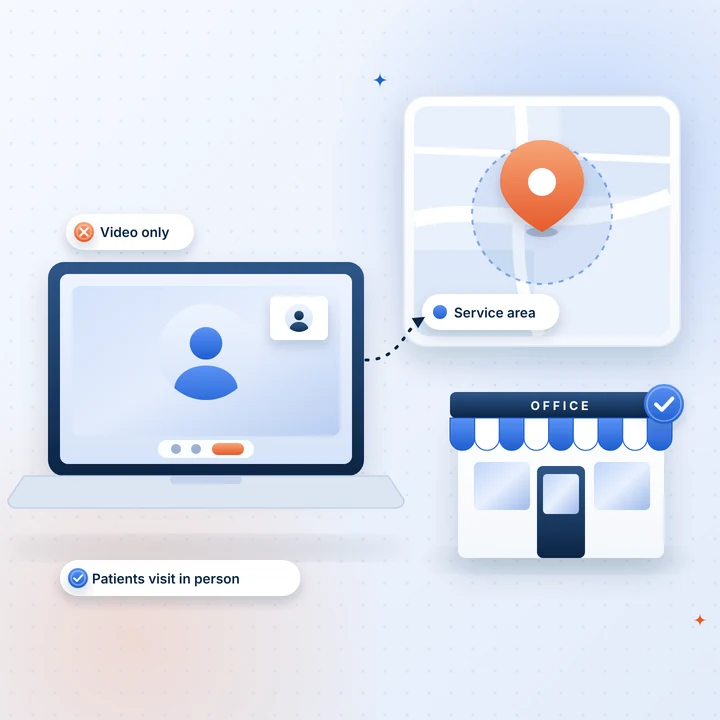
A practice that sees every patient by video does not qualify: Google’s rules treat it as an online-only business.
Google’s business eligibility and ownership guidelines name online-only businesses among those that cannot have a profile. Its getting-started page states the test: a business with no location people can visit, and no in-person visits to them, is not eligible.
Telehealth is not named anywhere in those rules. Video care still counts as online-only, because no patient meets the provider at a place Google can map.
The sections below sort real practice setups by that test. For practices that already see patients in an office, the steps are in Google Business Profile setup for doctors.
Which practice setups qualify, and whether the address shows
Of the 8 setups providers ask about most, 5 can qualify and 3 cannot. The difference is whether patients meet the practice somewhere real.
The table runs from setups that qualify to those that do not. Each condition comes from Google’s guidelines for representing your business.
| Practice setup | Eligible | Address on the profile | What Google requires |
|---|---|---|---|
| Office patients visit during stated hours | Yes | Shown | Permanent signage; staffed during stated hours |
| Part-time or shared office | Yes, if staffed and receiving patients during the hours listed | Shown | List only the hours the practice is there |
| Coworking office | Only with signage, patients received there and practice staff present | Shown | All three conditions during business hours |
| Home office where patients come | Yes | Shown | Permanent signage at the address |
| Video plus regular visits to patients’ homes | Yes, as a service-area business | Hidden | Service area within about 2 hours of driving from the base |
| Virtual office or rented mailing address | No | n/a | Not eligible |
| P.O. box or remote mailbox | No | n/a | Not accepted as an address |
| Video only, from home or anywhere | No | n/a | Online-only businesses are ineligible |
The last three rows are the workarounds most often suggested to video-only providers. A rented address does not change how the practice works. Google requires a profile to reflect the business accurately, and a borrowed address does not. Read why listings on a borrowed address get suspended before anyone suggests one.
Before you decide what to build, see what a website and a Google Business Profile cost per month.
Google’s test
Two ways in, and only one hides the address
Every setup comes down to whether patients meet the practice in person, and where.
Patients visit an office
- Eligible
- Yes, as a storefront
- Address
- Shown on the profile, home office included
- Condition
- Signage, and staffed during the hours listed
You travel to patients
- Eligible
- Yes, as a service-area business
- Address
- Hidden; the profile shows the areas served
- Condition
- Regular visits within about 2 hours of driving
Video only
- Eligible
- No, an online-only business
- Address
- Hiding one does not change that
- Instead
- Own website, directories and referral partners
Virtual offices and mailboxes are not eligible addresses“By appointment only” goes in the description
When Google lets you hide your address
Google hides an address only for a business that travels to patients. A home office where patients arrive is a storefront, and its address shows.
Google calls a business that serves people at their own locations a service-area business. Its guidelines tell these businesses to hide the address from the profile. Google’s own example is a plumber who runs the business from a home address.
Hiding an address also never makes a video-only practice eligible. With no in-person visits in either direction, there is nothing for the profile to describe.
Practice marketing from Northgate Billing sets up a Google Business Profile only for a practice whose office or home visits meet Google’s guidelines.
If you travel to patients
A provider who sees patients by video and also visits them at home qualifies as a service-area business. The profile shows the areas served, not the base address. Service areas have their own limits; see how many service areas a listing can cover.
A practice with an office and regular home visits can do both. It shows the office and adds a service area.
If patients come to your home office
The address shows on the profile, and Google expects permanent signage with the business name there. Listing a home address is a real decision about safety and household privacy, and some providers decide against it.
A common piece of advice, repeated in some AI answers, suggests the opposite. It says to see patients at a home office, then hide the address as a service-area business. Google’s guidelines do not support that. Hiding is tied to travel, not to privacy.
When a telehealth practice can qualify
A telehealth practice qualifies once it sees patients in person at an office it runs. That office must be staffed and open to patients during the hours it lists.
The office does not need to be full-time. A sublet room used a few days a week can carry a profile. The listed hours must match the days someone is there to receive patients. Hours that promise an open door when nobody is there break the condition.
Google’s More hours setting can flag times for specific services, but Google says those hours should generally sit inside the main hours. Video hours outside the office’s open hours do not belong there.
A coworking space is held to the stricter test in the table. A drop-in desk with a mailing address meets none of its three conditions.
Once listed, a hybrid practice can show its video care on the profile. Google has offered health practices an Online care attribute, plus links for virtual care and booking.
Google may ask a shared or part-time office to prove that patients are received there before the profile goes live. The checks are covered in verifying a shared or part-time office.
How to make a Google business with appointments only?
Google’s guidelines list businesses that operate only by appointment among those that should not provide hours. An appointment-only practice still needs an office patients visit; the rule changes the hours field, not who is eligible. A practice that books by appointment and sees everyone by video remains ineligible.
That rule sits beside the staffed-hours condition above. The practical reading: list hours only when the office is staffed and can take patients.
How do you say “by appointment only”?
On a Google Business Profile, say “by appointment only” in the description and the attributes, never in the business name. Google does not allow hours information in the name. Its own examples of rejected names include one ending in “Open 24 hours” and one ending in “(Closed)”.
The description is the place for one plain line, such as: “Patients are seen by appointment at our downtown office. Video visits are available too.” Google allows no links there, and the text may not focus on promotions or prices.
If Google offers an appointment-required attribute for your category, turn it on. Wording never changes eligibility.
Alternatives for getting found online
A practice Google will not list gets found through its own website, directories and referral partners.
A website on the practice’s own domain is the base. A page for each state where the provider is licensed tells patients where care is available. Directories such as Psychology Today list providers by state and specialty, which suits a practice with no map pin.
Referral partners, from primary care offices to employee assistance programs, round it out. The order to work in, and what each channel is worth, is laid out in marketing for therapists in private practice.
Seeing patients in several states also adds licensing and payer work; telehealth credentialing across state lines covers that side. For a mental health practice that also wants help with claims, see mental health billing services.
Conclusion: getting a telehealth-only practice found on Google
If every patient is seen by video, a Google Business Profile is not worth forcing. A borrowed address puts the listing at risk, and the same effort goes further on a website and directory listings. Once the practice qualifies, medical practice marketing services can keep the profile current.
Northgate Billing signs a Business Associate Agreement under 45 CFR 164.504(e) before it touches a record. It keeps patient information out of every Google listing it manages. For HIPAA questions beyond this post, see HIPAA rules for 2026. The question left is what SEO, a Google Business Profile and a website cost per month.
Frequently asked questions
Can a virtual business have a Google Business Profile?
Not unless it meets people in person somewhere. Google’s eligibility guidelines list brands, organizations, artists and other online-only businesses among those that cannot have a profile. A virtual practice qualifies only through an office patients visit or regular visits to patients; video visits alone do not count.
Is Google Meet HIPAA compliant for telehealth?
Google Meet is on Google’s list of services covered by its HIPAA business associate terms for Google Workspace. The practice needs a Workspace account, must accept Google’s Business Associate Agreement and must set Meet up correctly. A free personal account cannot sign one. The same Workspace account can manage the practice’s Google Business Profile, if the practice qualifies for one.
What if I don’t have a physical address for my business for Google?
Then the business can be listed only if it travels to people, as a service-area business with the address hidden. Google does not accept a P.O. box, a remote mailbox or a virtual office as an address. A telehealth-only practice without home visits has no eligible address, so its website and directory listings carry the work instead.
How much does Google Appointment Scheduling cost?
One booking page is free with a personal Google account. Multiple booking pages, email reminders and other premium features need an eligible Google Workspace plan or, for personal use, Google One Premium. The price depends on the plan. A booking link works on a practice website without a Google Business Profile, so a telehealth-only practice can still use one.
Is Google Business Profile HIPAA compliant?
No, and it is not built to be. A Google Business Profile is a public listing, and Google’s HIPAA business associate terms do not cover it. Nothing that identifies a patient belongs in any field or post on the profile. The listing should carry only practice details such as name, address, hours and services.
What is the best platform for telehealth?
No single platform suits every practice. Look for one that signs a Business Associate Agreement, works with your records system and is easy for patients to join. Some practice management systems, such as SimplePractice and TherapyNotes, include video visits. A practice with an office can add that platform’s booking link to its Google Business Profile.
Can a telehealth provider in a group practice have their own Google listing?
Only in some cases. Google allows an individual practitioner a profile when they are public-facing and can be reached directly at the verified location during stated hours. A provider who sees patients at the group’s office on set days can meet that. A provider who sees patients only by video from home cannot, even if the group’s office is listed.
See what getting found online costs
SEO, Google Business Profile and website costs, laid out month by month.
Read the cost breakdown
Written by
Kenzo Sanford
Practice Marketing Lead, Northgate Billing
This article explains Google’s listing rules as they stood in November 2026. It is general information, not legal advice. Google updates its guidelines, so check the linked pages before you act.